Operations / 2026
PEOPLE OPERATIONS HUB
At Lojas Mari, examinations, vacations, medical certificates and probation periods were followed in different places. This application brings each case, its documents and its next deadline into one routine the team can consult.
The challenge
Before the application, each subject had its own spreadsheet, message thread or reminder. As a result, a simple question such as “what is still pending for this employee?” required several checks, and a deadline could be separated from the document or conversation that explained it.
Who it serves
I built the application for the Lojas Mari staff responsible for personnel records and for following examinations, vacations, medical certificates and probation periods through to completion.
What I built
I designed and developed the complete web application, from the data model to the interface. Before writing the code, I mapped the steps used for examinations, vacations, medical certificates and probation periods, then defined which information needed to follow each case. I implemented sign-in, forms, status changes, search, filters, CSV export, document generation and scheduled reminders.
How it works
Node.js and Express serve the interface written in JavaScript, HTML and CSS. Sessions protect the private routes, while the current version stores its records in JSON files. Scheduled jobs create the reminders, and the document utilities work in memory so they do not need to retain temporary copies.
What each tab handles
Although the subjects are different, the team follows all of them in a similar way: find the person, check the current stage and identify the next action. For that reason, each tab has its own fields and rules but keeps the same search and filtering pattern.
Examinations
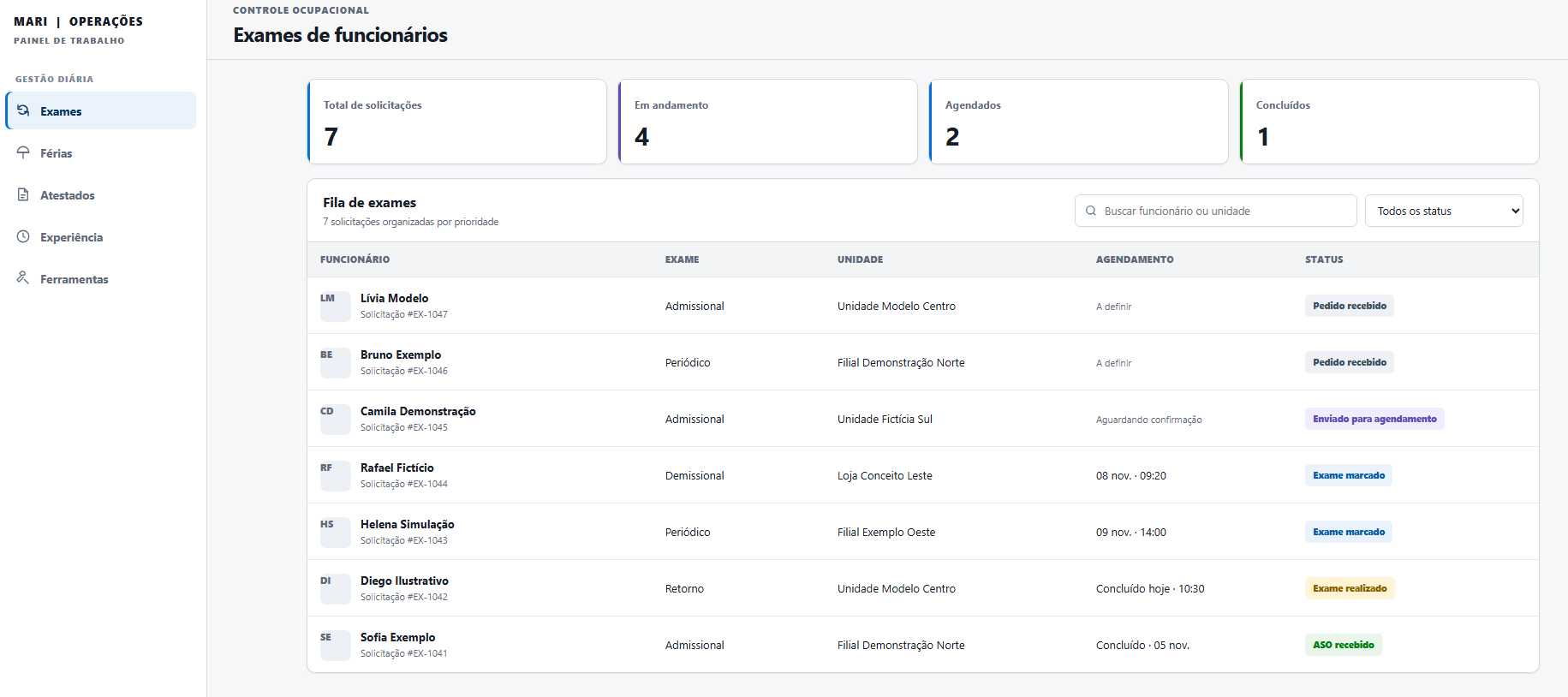
This is the most detailed queue because an examination passes through several people before it is complete. It records the employee, branch, examination type and appointment, then follows the request from arrival and scheduling through completion and receipt of the ASO.
Vacations
A vacation request depends mainly on dates and the handoff to accounting. The tab records the start and length of the period, then shows whether the information still needs to be sent, has been received there or can be closed.
Medical certificates
The purpose here is operational follow-up, not a clinical record. The main queue therefore keeps the receipt date, number of leave days and current status, while related certificates can be checked within a 60-day period.
Probation periods
In this tab, the deadline is the central piece of information. Contracts are ordered by the next date, showing when the period began, when it currently ends and whether it is in progress, close to ending or has been extended.
Tools
This section groups tasks that are useful but do not need a permanent queue: generating uniform and PPE forms, reviewing fields read from payroll PDFs, and reconciling payroll with bank reports for CSV or XLSX export. The source files are processed without keeping another stored copy.
Key decisions
- Use a fixed sequence for every examination request, from its arrival to receipt of the ASO. This makes the next action visible in the queue instead of leaving it inside a message or record.
- Keep search, status filters and CSV export beside the main queue, since the actions used most often should not require another screen.
- Require sign-in for personnel records and process temporary documents in memory. The tool needs the information while it works, but it does not need to keep another copy afterwards.
Outcome
The resulting flow gives the team one place to find a person, understand what is pending and continue the case. A current list can also be filtered or exported without being rebuilt by hand in another spreadsheet.